 Jambolaya
FreeCell
How to play
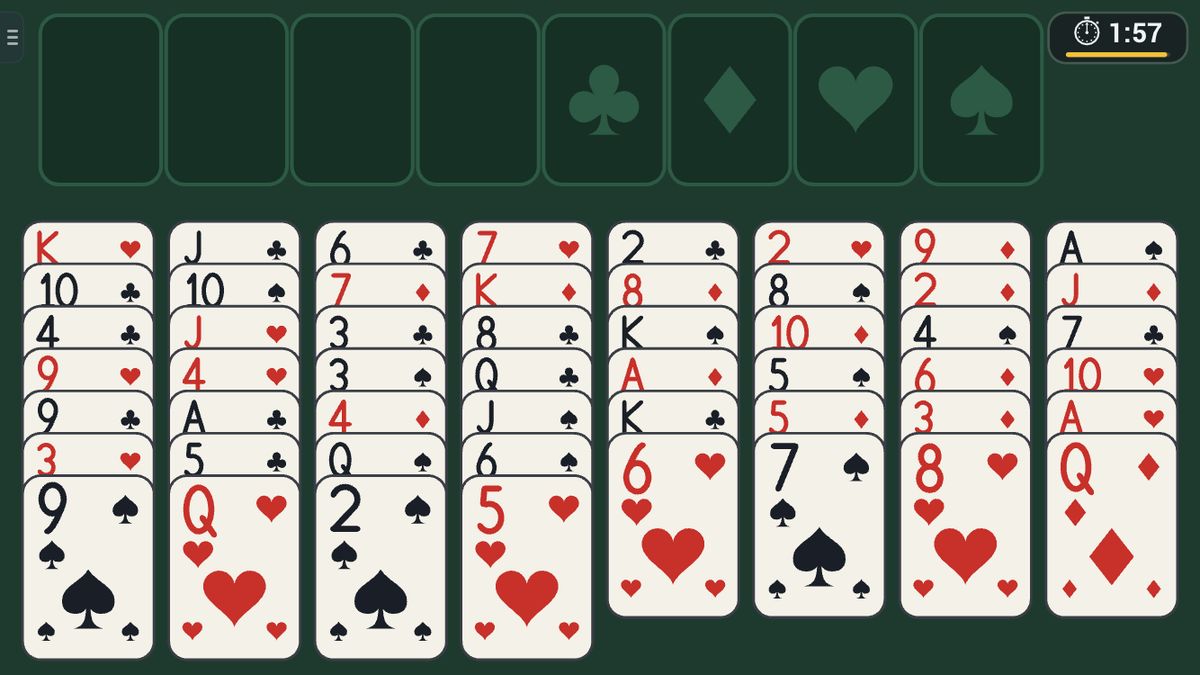
All 52 cards are dealt face-up into eight columns — nothing is hidden. Above them sit four free cells (each holds one card) and four foundations. Build the foundations up by suit from Ace to King; that's your score.
On the tableau, cards stack DOWN in alternating colours (a red six goes on a black seven).
Tap a card to send it straight to a foundation when that's the obvious move; otherwise tap it to pick up the ordered run beneath your finger, then tap where it should go — another column, an empty free cell, or a foundation.
You can shift a run of cards at once, but only as many as (1 + empty free cells) × 2 for each empty column — so keep cells and columns open. Clear all 52 to the foundations to win instantly; otherwise the higher score when the timer runs out takes it.
Ways to play
- On your ownPlay alone, whenever you like.
- Play together, nearbyOne-on-one with someone in the same room, each on your own phone or tablet. No Wi-Fi or internet needed. In the Jambolaya app.
- Learn by playingA guided lesson on the real game teaches you the rules one step at a time.
 Pyramid1–2 players
 Tri-Peaks1–2 players
 Golf Solitaire1–2 players
 Spider1–2 players
 Mahjong Solitaire1–2 players
 Cross Sums1–2 players
 Bridges1–2 players
 Tower Stack1–6 players